
Email from the command line, done right.
Mailfire sends plain-text, Markdown, and HTML email from scripts, cron jobs, CI pipelines, and your terminal — through Mailgun, Gmail, or any SMTP server. Beautiful templates, attachments, retries, and JSON output included.
A single binary for Linux, macOS, and Windows. Open source, MIT licensed.
$ mailfire --md --to ops@example.com --subject "Nightly backup" <<EOF
# Backup finished

All **12 hosts** completed in 4m 31s.

> [!WARNING]
> files01 needed a second attempt.
EOF
<20261018T091500.3ad5358f96c70a25@example.com>
Everything a notification needs
Markdown that looks great
Write Markdown or HTML and Mailfire renders it into a responsive template that works in Outlook, dark mode, and on mobile — with a plain-text alternative.
Markdown, alerts, and imagesThree ways to send
Use the Mailgun API, your Gmail account with send-only OAuth, or standard SMTP submission to any provider or local relay.
SMTPNever lose a message
Network errors and outages defer the message instead of dropping it. mailfire resend retries with backoff from cron.
No alert storms
Opt-in deduplication sends a repeated monitoring alert once per cooldown, across sends and retries.
Notification deduplicationBuilt for scripts
Stable exit codes, one JSON document per command, and environment-only configuration for CI and containers.
Scripting and automationPreview before you send
Render the exact HTML body to a file without credentials or network access, and iterate on templates offline.
Local previewFour templates, or your own
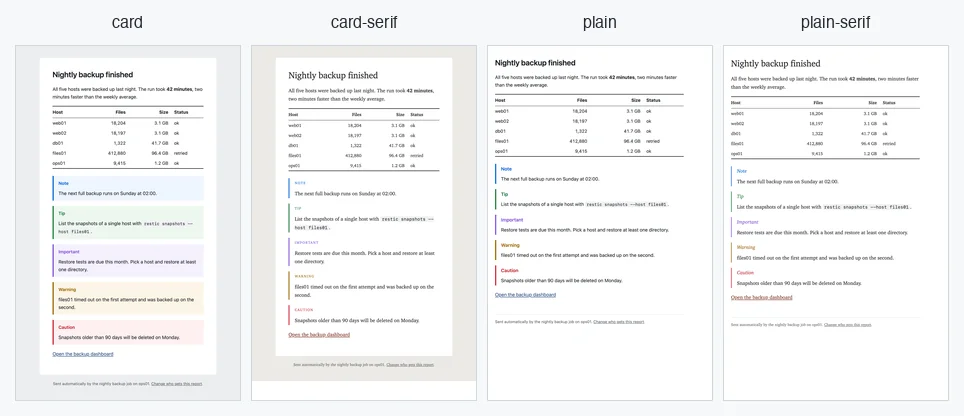
card, card-serif, plain, and plain-serif cover reports, alerts, and newsletters. Export them, edit the HTML and CSS, and Mailfire inlines the styles so every client renders them the same.
Pick your provider
Install in seconds
brew tap thorstenkramm/tap brew trust --cask thorstenkramm/tap/mailfire brew install --cask mailfire# Add the signed, pinned repository first (see the Linux guide), then: sudo apt install mailfire# Add the signed repository first (see the Linux guide), then: sudo dnf install mailfiregit clone https://github.com/thorstenkramm/mailfire.git cd mailfire && make build